Photo assets
Docbank groups ordinary file nodes into photo assets. Each file node and its content versions still hold the bytes. An asset stores only membership, roles, display selection, exclusion, and bounded decision receipts.
Image files and files with a concrete video/* MIME type are enrolled when
they are created. Audio, generic video, and generic RAW files stay ordinary
files until an operator promotes or creates an asset explicitly. Enrollment
applies only to new files. Adding this feature does not scan older files.
Replacing or reverting a file's content keeps the file in its asset with the same role, even when the new media type would not qualify. A file whose new content qualifies is not enrolled either. Membership changes only through explicit asset operations or permanent node deletion.
An asset can contain raw, image, video, and sidecar members. The
default display order is RAW, image, then video. A vault preference can select
image before RAW, and an asset override wins over the vault preference.
Sidecars never display and must point at a RAW or image member in the same
asset. Removing the selected member chooses another displayable member
atomically, or stores a null display when none remains. Assets are limited to
256 files.
Browse in the web app
Open docbank web and choose Photos in the sidebar. Library opens at
/photos, newest captures first. Photos without a capture date appear under
Undated. The year buttons jump to the years loaded so far; scrolling loads
more photos and reveals older years. Choose Load more to continue from
the same position when further results remain.
Choose Months or Capture sessions to group the grid. A session joins captures
with gaps of four hours or less. Compact, Comfortable, and Large change the
grid density. The browser remembers the density across reloads and fresh
docbank web links until the daemon restarts on a new address.
Click a photo to select it. Shift-click adds the range from the previous selection, including loaded photos outside the screen. Ctrl-click or Command-click toggles a photo. Each photo also has a checkbox for touch. The selection dock can select all loaded photos or clear the selection.
Photos, selection, and scroll position stay in place across Documents/Photos switches until the session locks or ends. Switching workspaces stops unfinished photo reads while retaining loaded photos. Previews already seen stay in a private browser cache for that signed-in session. Only mounted photos keep image URLs. Docbank deletes the cache when the session locks or ends, or the page closes. If a page closes without that cleanup, for example after a browser crash, the next signed-in session at the same docbank web address deletes the leftover cache. Caches from earlier addresses stay in browser storage until site data is cleared. Previews still display when browser storage is unavailable, but revisiting them may download them again.
Pending, unsupported, and failed previews have separate placeholders. Choose
Refresh previews to reload the listing after background preview work finishes.
If a page fails to load, the earlier photos remain visible. Retry requests the
failed page again. Refresh and expired-cursor recovery keep the current grid visible until the refreshed range succeeds. Selection retains photos in that range; imports or deletions may move the visible photo outside it. Failed attempts keep the earlier view available for Retry. Recovery stops after one minute and offers Retry if it needs more time.
Previews
The daemon produces a grid preview with a 512-pixel maximum edge for each included photo's selected display file. It discovers new imports continuously and resumes missing work after restart. It keeps completed results.
Embedded applications can request fit previews at 2560 pixels or large previews at 4096 pixels. All sizes preserve aspect ratio and never upscale. JPEG, PNG, GIF, still WebP, and supported embedded JPEGs in ARW, DNG, CR2, NEF, and RAF files have decoder paths. Format support does not guarantee that every individual file decodes. Unsupported and deterministic decode failures are stored as terminal results. Temporary storage or read failures retry.
Quality signals
The daemon measures each ready grid preview locally. The photo query API
returns quality.state as ready with numeric scores after measurement,
or pending with signals: null while work can finish. A measured zero stays zero.
Replacing content or changing the display file selects that version's signals.
Videos have no quality object. unavailable with signals: null means work
has finished without scores: the grid preview is unsupported or failed, or its
verified bytes do not decode. Temporary read failures stay pending and retry.
All scores use the 0..1 scale. Focus measures adjacent luminance differences
on a 16-by-16 sample, stretched by a 0.15 calibration ceiling. At that size it
tracks coarse, large-scale contrast, not sharpness: a blurred copy of
a photo scores close to the original, and a sharp photo of a plain surface
scores low. Blur is 1 - focus. Brightness uses
RGB luminance weights, with black at 0 and white at 1. color_red,
color_green, and color_blue are mean channel values. Framing scores the
contrast-weighted center against the rule-of-thirds intersections. Flat
images receive framing 0.5. Aesthetics combines focus, balanced exposure,
channel spread, and framing. These pixel heuristics do not judge subject
intent, distinguish motion blur from soft focus, or detect faces.
Scores can differ slightly from other tools because of image sampling differences.
Each scalar supports _min and _max query filters. JSON bounds are decimal
strings, such as "brightness_min":"0.4", to preserve QueryV1's integer-only
JSON number contract. Advanced search accepts brightness_min:0.4 color_blue_min:0.5.
Quality filters follow the same version as other photo metadata filters. Photos
uses the asset's selected display; Documents uses each document's own version.
unevaluated:true selects versions eligible for measurement with pending or
unavailable measurements. Expressions reject unevaluated:false; use
focus_min:0 for measured photos. Structured "unevaluated":false acts as omission.
Missing measurements fail numeric comparisons. Saved queries keep these filters.
Signals rebuild after restore and stay out of backups.
CLI
Inspect the asset created for a node or use a stable asset UUID:
docbank photos assets inspect <asset-id|node-selector>
docbank photos assets create <node-selector> [--kind photo|video] [--role raw|image|video]
docbank photos assets attach <asset-id> <node-selector> [--revision REV] [--role ROLE] [--sidecar-of-file-id ID]
docbank photos assets detach <asset-id> <file-id> [--revision REV]
docbank photos assets exclude <asset-id> [--revision REV] [--excluded=true]
docbank photos assets promote <node-selector> [--revision REV] [--kind KIND] [--role ROLE]
docbank photos assets display <asset-id> [file-id] [--revision REV]
inspect, create, and promote accept absolute virtual paths or id:N
node selectors, so inspect id:42 finds the asset that owns file 42, even
after file 42 is trashed.
Operations on an existing asset read its current revision, send it, and retry
once if another write changes the asset first. Pass --revision with the
revision from your last inspection when a script needs the write to fail
instead. Omitting the file ID from display clears the asset override.
The vault preference is revisioned separately:
docbank photos settings show
docbank photos settings set raw [--revision REV]
docbank photos settings set image [--revision REV]
docbank photos settings reset [--revision REV]
Asset and settings commands emit bounded JSON. Exit code 4 means the revision is stale: the
--revision you passed no longer matched, or the one automatic retry lost to
another write. Read the asset or settings again before retrying. The daemon
performs role, ownership, sidecar, display, and audit checks.
Albums
Albums group photo assets without moving their files. Manage albums through the CLI or HTTP API. The web app's Photos workspace browses the library; album management is not available there.
Create an album, add selected asset UUIDs or a complete query result, then browse its members:
docbank photos albums create "Holiday"
docbank photos albums list
docbank photos albums show <album-id>
docbank photos albums add <album-id> <asset-id> ...
docbank photos albums add <album-id> --query "{\"filters\":{\"kinds\":[\"photo\"]}}"
docbank photos albums members <album-id> --sort added_time --direction desc
members accepts added_time, import_time, or capture_time, plus --page-size and --cursor. Capture dates with missing evidence come last. Ties use ascending asset UUID. The cursor binds the album ID as well as the query and page options.
docbank photos albums rename <album-id> "Trip"
docbank photos albums star <album-id> [--starred=false]
docbank photos albums cover <album-id> [asset-id]
docbank photos albums duplicate <album-id> "Trip copy"
docbank photos albums remove <album-id> <asset-id> ...
docbank photos albums delete <album-id>
Existing-album writes accept --revision with the same automatic read and retry as asset writes. Repeating an unchanged decision preserves the revision. Deleting an album keeps every photo and file. Duplication preserves added dates and member order. Removing the chosen cover clears the override. A ready grid preview of the chosen member wins; otherwise the newest added included member with a ready grid preview supplies the cover.
add and remove accept up to 1,000 explicit IDs or --query with strict QueryV1 JSON. A query selects its complete current photo result inside the membership transaction, including display metadata and duplicate collapse. Query scopes have no total member cap. Their sort field, including added_time, does not change the selected IDs. A query selects only visible photos, so remove --query keeps excluded, trashed, and empty members; remove those by asset ID or delete the album. Coverage-dependent queries accept --coverage and --profile-fingerprint. Each changed action advances the album revision once and records all changed IDs in bounded receipts. An invalid ID, query, coverage, or stale revision rolls back the complete action.
Exclusion, ordinary trash, detach, and permanent file deletion keep album membership and its added date. member_count counts members with at least one file. Empty members disappear from counts, browsing, and the effective cover until a file is attached again. These file changes preserve the album revision and chosen cover. Included counts and member browsing also omit excluded and trashed photos until they become visible again. Album names can repeat. Use set: followed by an album UUID, or typed filters.set_ids, to filter by membership. Values within set_ids combine with OR.
Import a camera folder
photos import reads a folder on the daemon host and imports its photos into a
vault folder:
docbank photos import <source-root> [destination] [--json]
docbank jobs show <operation-id> --json
docbank jobs cancel <operation-id>
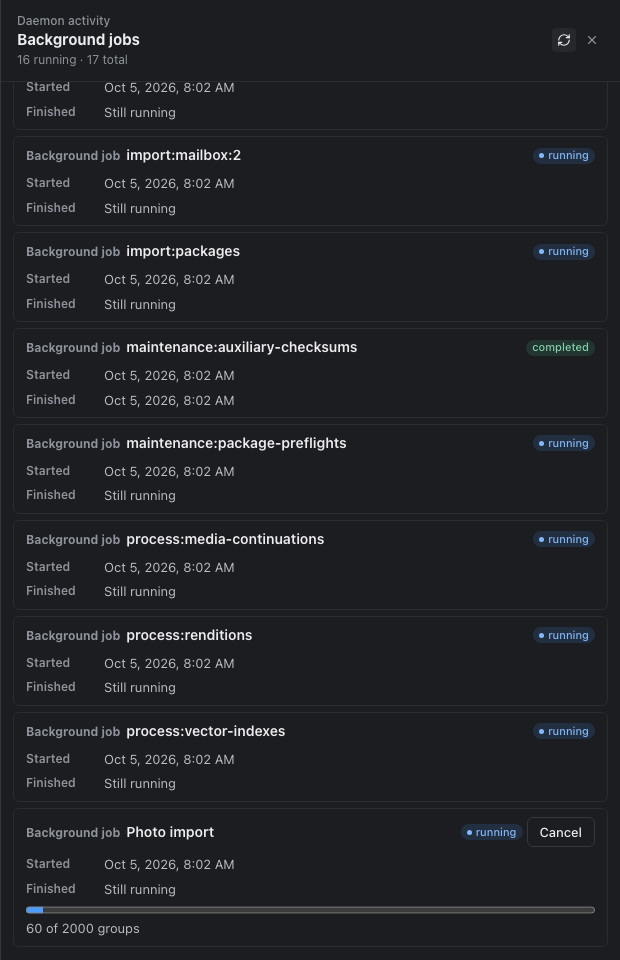
photos import queues the import as a background job and prints its operation
ID. Follow and stop it like any other background job: jobs show reports
progress and the import receipt, and jobs cancel stops it.
The import reads RAW files (.ARW, .CR2, .CR3, .DNG, .NEF, .ORF,
.RAF, .RW2), images (.JPG, .JPEG, .PNG, .GIF, .WEBP, .HEIC),
videos (.MP4, .MOV, .M4V, .AVI, .MPG), and .XMP sidecars. It leaves
every other file out and counts it as unsupported in the receipt. The source
folder must exist when you start the import. Otherwise the command fails with
exit code 2 and no import starts.
Files with the same folder and name, such as IMG_0001.ARW, IMG_0001.JPG,
and IMG_0001.XMP, become one photo. The XMP sidecar attaches to the RAW, or
to the JPEG when there is no RAW. An XMP with no same-name RAW or JPEG imports
as a plain file. A later full scan pairs companions when both source files
are still present. Matching uses files in the scan and their current duplicate
owners. A video always becomes its own photo. Each photo commits in one
transaction, so a failure leaves no half photo behind, and running the same
import again skips content already in the vault. A file edited since it was
imported, such as an XMP saved again by a photo editor, becomes a new version
of the file already in the photo, not a second file.
The import leaves a group unpaired and lists it under ambiguities in the
receipt from jobs show <operation-id> --json in two cases:
- Two RAW files share a name, such as
IMG_0001.ARWandIMG_0001.DNG. Each RAW and JPEG becomes its own photo and the sidecar stays a plain file. - Same-name files already sit in separate photos. Nothing is merged.
Pair the RAW and JPEG files yourself: photos assets inspect <asset-id> shows
file IDs, photos assets detach frees a file, and photos assets attach adds
it to the other photo. A later scan containing the sidecar and its image
attaches it to the settled photo. The final receipt lists every group that
remained ambiguous during that run, with each file's source path, node ID,
role, and photo asset ID.
The import hashes the discovered files, waits one second, then compares each durable copy with that observation. It hashes every group member again before committing. A changed or deleted source leaves the entire group out and counts as changed, even if its size and modification time stayed the same. Import again to pick it up.
The web Jobs drawer shows progress and has a Cancel button while the import runs. It leaves out source paths and the unpaired-group list. Cancel takes effect before the next group. A daemon restart resumes an unfinished import by scanning the folder again.
HTTP and JSONL
The daemon exposes asset inspection by asset ID or node ID, plus create,
attach, detach, exclude, promote, display, and settings operations under
/api/v1/photos. Existing-asset and settings mutations require If-Match.
Responses carry the new revision in both the body and the ETag header.
Photo assets, file memberships, the singleton settings row, and change receipts are part of the deterministic metadata JSONL stream. Restore checks node ownership, local pointers, sidecar targets, display selection, enum values, revisions, receipt JSON, and the complete graph before commit. Older supported metadata streams restore an empty photo authority.
Email children are identified by email_document_relations.child_version_id.
An image produced by processing remains eligible when it is not an email
child. Existing graphs survive ordinary trash and restore. Permanent node
deletion removes file memberships and repairs the affected asset while preserving
an empty asset identity.
Automatic enrollment and explicit graph writes are skipped or refused when audit authority is active, according to the existing audit boundary. The preexisting graph is preserved. Photo trash and restore remain available under audit and record audited node changes plus photo revision receipts.
Browse photo assets over HTTP
POST /api/v1/photos/assets/query accepts a query object using
QueryV1,
optional coverage, page_size from 1 through 250, and cursor. It returns
items, the matching asset total counted on the first page, and an optional
next_cursor. Later pages keep that total. Start a new browse to refresh it.
The default page size is 50. Send the same query and page options with each
continuation. Editing a saved query invalidates its earlier cursor. Cursors
expire after 15 minutes. Results are live: file changes can move assets across
the previous page boundary.
Use kind:photo, camera:"Synthetic Camera", lens:"Synthetic Lens",
iso:400, iso_min:100, iso_max:800, capture_after:2024-01-01,
capture_before:2025-01-01, gps:"-10,170,10,-170", or asset: or set:
followed by a canonical asset or album UUIDv4. Existing collection:, tag, and text predicates combine
with these fields. Camera and lens match the complete make or model, ignoring
case using Unicode case folding. Values in one typed filter array combine with
OR. Separate filters combine with AND.
Dates use the photo's recorded local calendar day, with an inclusive lower bound and exclusive upper bound. A January 1 photo remains in January 1 date filters even if its recorded UTC offset puts it on January 2 in UTC. GPS uses inclusive decimal-string latitude/longitude bounds and permits boxes crossing the antimeridian.
Camera, lens, ISO, capture-date, and GPS predicates use the asset's selected
display file. Metadata from other members is not combined with it. If the
selected RAW has camera A and its paired JPEG has lens B, camera:A matches
and lens:B does not. A sidecar without camera metadata cannot make
NOT camera:A match. Changing the display file changes these metadata matches.
Ordinary text, name, extension, tag, and collection predicates still match
individual members. One member must satisfy the complete expression, using
the display file for its photo metadata predicates. For example,
extension:xmp AND camera:A can match a sidecar paired with a display image
from camera A. Saved expressions follow the same rule. Document queries keep
using each document's own metadata. Excluded, trashed, and displayless assets
stay out.
Sort by capture_time, import_time, name, modified_at, size, or
media_type, with asc or desc. Set filters.set_ids to album UUIDs to browse their members. added_time requires exactly one album ID after normalization. Capture sorting converts recorded offsets
to UTC. Omitted zones use civil calendar coordinates. Missing or unreadable
capture times sort last in both directions and do not match capture-date
filters. Asset UUID orders equal keys. Names and media types compare only their
first 1,024 characters, so longer values that share that prefix also fall back
to UUID order. path and relevance are unsupported by this route. Document
snapshots reject capture_time, import_time, and added_time with an error naming Photos
as the supported view.
Each row has grid, fit, and large preview slots. missing means no result is
stored for that recipe. Stored ready, unsupported, and failed outcomes
keep their generation identity. Only ready slots include a generation URL and
JPEG output metadata. Read that URL with the browser session header.
Credentials stay out of URLs.
Preview responses use Cache-Control: private, no-cache: the browser may keep
bytes but must check with the server before reusing them. A matching
If-None-Match returns 304 after the server checks the session, current
display, and exclusion state. This avoids reading the preview blob again.
An excluded asset or replaced display returns 404, even with a matching
validator. A response with new bytes verifies the complete image. Listing
never creates previews.
The initial count evaluates the whole query. Later pages seek from the last sort key. Queries that collapse duplicate content still evaluate the complete matching population to choose representatives before returning a page.
Move photos to trash
Select photos in Library and choose Move to trash. Confirming moves every member of each selected photo, including RAW files, images, videos, and sidecars, to recoverable trash together. A changed photo revision refuses the action; failed photos remain selected for retry. Each photo is atomic; a selection runs sequentially and can make partial progress. Changing the selection changes the next action's targets. A failed photo outside the loaded grid keeps its captured revision; load and select it again before accepting a newer revision.
Use docbank photos assets trash <asset-id> for the same operation from the CLI. --revision binds the action to an inspected asset revision. Ordinary Documents deletion and docbank rm still remove the selected file or folder.
Open Trash in either workspace to restore a photo group. One row represents its independently trashed members and shows how many trashed files restore will recover, including companions inside folders. Restoring any member recovers the complete group. The selected member's revision guards the request; Docbank reads all affected roots in the same transaction. A member inside a trashed folder restores that folder's subtree and the photo's companions elsewhere. Selected destination folders return before their files. Separately trashed unrelated items stay in trash.
Trash keeps file bytes, content versions, photo relationships, and album membership intact. Trash and restore each advance the affected asset revision once and record a change receipt. Permanent deletion waits until every member is trashed, old enough, and free of retention references. For a partially trashed photo, trash the remaining companions with the asset action or detach its live companions before emptying trash. See Trash and garbage collection.
Metadata JSONL v1 includes trash and restore receipts recording the operation and asset revision change; node trash state remains in the node records. Older Docbank clients refuse imports containing these operations; use a version that supports photo trash to restore that metadata.